How to Write AI Image Prompts: The Complete Guide for 2026
The difference between a weak AI image and a stunning one almost always comes down to the prompt. Two people can use the exact same AI tool and get completely different results, one producing generic, flat images and the other producing cinematic, photorealistic outputs that look like they came from a professional studio. The variable between them is not the tool. It is how they write their AI image prompts. This guide covers everything you need to know to write prompts that consistently produce the results you are actually looking for.
What Are AI Image Prompts?
AI image prompts are the text instructions you give to an AI image generator to describe what you want it to create. When you open a tool like Midjourney, Google Flow, or Leonardo AI and type a description, that description is your prompt. The AI reads your prompt, processes it against everything it learned during training, and generates an image based on its interpretation of your instructions.
The quality of your AI image prompts determines almost everything about the quality of your output. A vague prompt produces a vague image. A specific, well-structured prompt produces a specific, well-executed image. Learning to write strong AI image prompts is the single highest leverage skill you can develop as an AI content creator because it improves every tool you use simultaneously.
Why Most AI Image Prompts Fail
Most people write AI image prompts the way they would describe something casually to a friend. They type something like “a woman in a forest” or “a scary monster at night” and then wonder why the results look generic and uninspiring. The problem is not that the concept is bad. The problem is that the prompt gives the AI almost no useful information to work with beyond the most basic subject matter.
AI image generators do not think the way people do. They do not fill in gaps with common sense or creative intuition the way a human artist would if you gave them a vague brief. They generate based on the statistical patterns in their training data. A vague prompt activates the most average, most common version of whatever you described. Specific, detailed AI image prompts activate more precise, more distinctive outputs.
Understanding this is the foundation of writing better AI image prompts. Your job is not to describe what you want in general terms. Your job is to give the AI enough specific visual information that it has no choice but to generate something close to what you actually envisioned.
The Core Structure of Strong AI Image Prompts
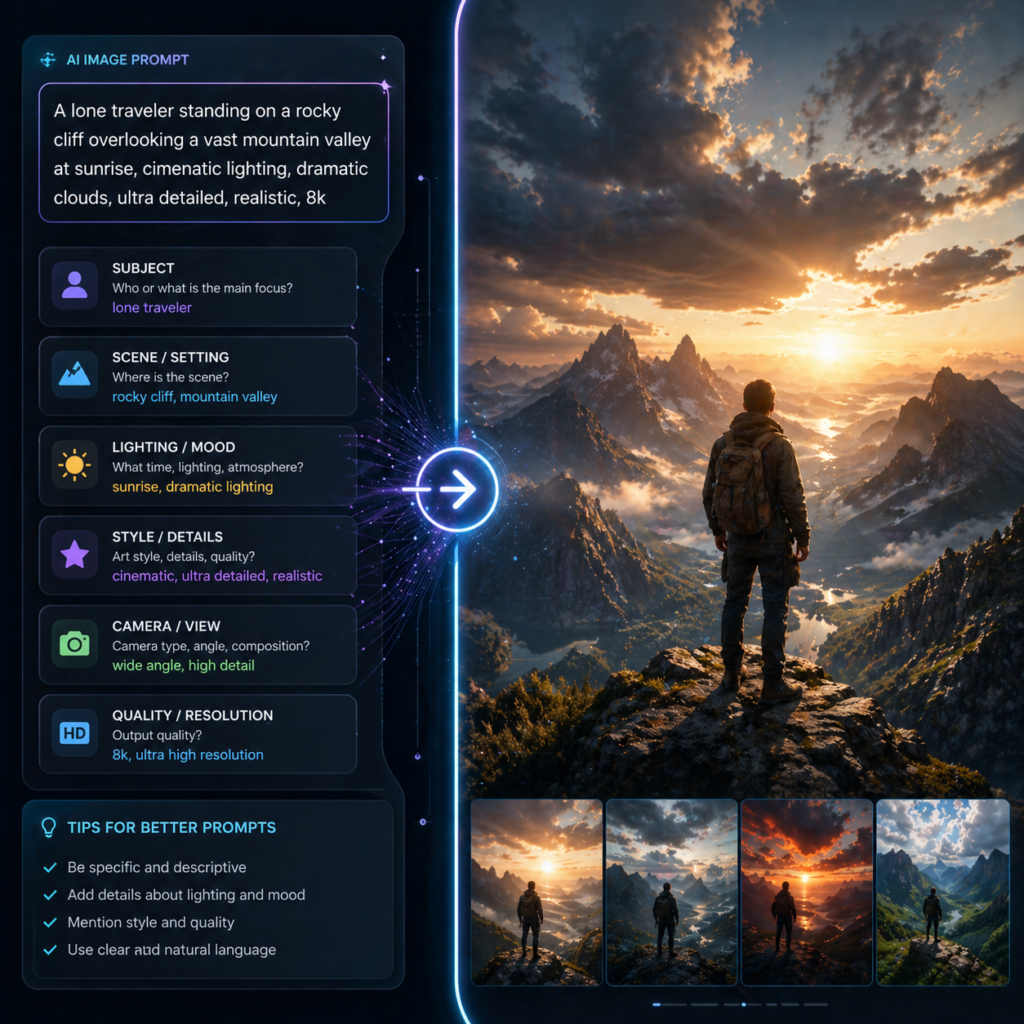
Strong AI image prompts follow a consistent structure regardless of the tool you are using. Once you understand this structure, you can apply it to Midjourney, Google Flow, Leonardo AI, or any other image generator.
Subject: What Is in the Image
Start your AI image prompts with a clear description of the primary subject. Be specific about who or what the subject is, what they look like, and what makes them distinctive. Instead of “a woman,” write “a woman in her late thirties with sharp cheekbones, dark eyes, and silver hair pulled back.” Instead of “a monster,” write “a tall skeletal figure with elongated limbs, hollow eye sockets, and cracked grey skin.”
The more specific your subject description, the more distinctive and intentional your output will look. Generic subject descriptions produce generic outputs. Specific subject descriptions produce images that feel designed rather than generated.
Setting: Where the Image Takes Place
After the subject, describe the environment or setting. This is not just about location. It is about atmosphere, time of day, weather, and the relationship between the subject and the space they occupy. “In a forest” is a setting. “Standing at the edge of a dense old-growth forest at dusk, mist rising from the ground between the roots, last light filtering through the canopy above” is a setting that the AI can actually render with specificity and mood.
Good AI image prompts treat the setting as a full participant in the image, not just a backdrop. The setting should contribute to the mood and meaning of the image.
Lighting: The Most Important Technical Element
Lighting is the element that most separates strong AI image prompts from weak ones. AI image generators default to generic, even lighting unless you specify otherwise. That default lighting is what makes so many AI images look flat and obviously artificial.
When you specify lighting in your AI image prompts, be precise about the source, direction, and quality of light. “Soft diffused morning light coming from the left, casting long gentle shadows” produces a completely different image than “harsh single overhead light with deep under-eye shadows and minimal fill.” Both describe lighting, but they produce completely different moods and visual qualities.
Some of the most effective lighting descriptions to use in AI image prompts include single candle as only light source, golden hour backlight with rim lighting on the subject, overcast diffused natural light with no hard shadows, practical light from a nearby screen casting blue on the face, and volumetric light rays through dusty air. Each of these creates a specific, recognizable visual atmosphere that elevates the output significantly.
Style and Aesthetic: What Kind of Image It Should Look Like
Describing the visual style of your intended output is one of the most powerful tools in writing AI image prompts. Style references help the AI understand not just what to generate but how it should look. You can reference photographic styles, artistic movements, specific film aesthetics, or technical camera characteristics.
Photographic language works particularly well in AI image prompts. Phrases like “shot on 35mm Kodak Portra 400, slight grain, warm tones” or “medium format film photography, sharp center focus, soft edges” tell the AI to treat the output as a photograph with specific technical characteristics. This is one of the most reliable ways to make AI images look more realistic and less generically digital.
You can also reference cinematic color grading, art movements, illustration styles, or specific visual aesthetics. “Cinematic color grading with crushed blacks and teal-orange contrast” is a style description that immediately shifts the mood of the output toward something filmic and professional.
Mood and Atmosphere: The Emotional Tone
Beyond the technical elements, strong AI image prompts include descriptors that establish the emotional tone of the image. Words like unsettling, melancholic, triumphant, dreamlike, clinical, intimate, and desolate give the AI directional information about the feeling the image should create in the viewer.
Mood descriptors work best when they are specific rather than generic. “Scary” is a mood descriptor but it is too broad to be useful. “The specific unease of being watched without being able to see who is watching” is a mood descriptor that gives the AI much more to work with.
How to Write AI Image Prompts for Photorealistic Results
Photorealism is the most requested output quality in AI image prompts, and it is also the hardest to achieve consistently. Here is the approach that works most reliably across the major tools.
Start by anchoring the output in photographic language. Describe the image as a photograph rather than a rendering or illustration. Phrases like “hyperrealistic photography,” “shot on a full-frame camera,” “documentary photography style,” and “editorial photography” all signal to the AI that you want photographic realism rather than an artistic interpretation.
Add specific camera and lens details to your AI image prompts. “Shot with a 85mm f1.4 lens, shallow depth of field, soft bokeh background” tells the AI exactly what kind of photographic perspective you want. “Wide angle 24mm lens, everything in sharp focus, slight distortion at the edges” creates a completely different perspective. These details make the output look like it was deliberately photographed rather than arbitrarily generated.
Avoid words that push the output toward illustration or digital art. Words like “digital art,” “concept art,” “fantasy,” “anime,” “illustrated,” and “cartoon” will pull your output away from photorealism even if you also include photorealistic descriptors. If photorealism is your goal, keep your AI image prompts clean of any terms associated with illustrated or stylized aesthetics.
How to Write AI Image Prompts for Horror Content
Horror is one of the most technically demanding categories for AI image prompts because the difference between genuinely unsettling and cartoonishly generic is entirely in the details. Most people writing horror AI image prompts make the mistake of using broad scary adjectives. The most effective horror prompts describe specific wrongness rather than general fear.
Instead of writing “a scary face,” describe what specifically is wrong with the face. “A face where the eyes are positioned fractionally too far apart, the smile extends slightly beyond where a normal smile ends, and the skin has the slightly wrong texture of something that is almost but not quite human.” That level of specificity is what creates genuine unease rather than generic horror imagery.
Environmental grounding is essential in horror AI image prompts. A horror subject placed in a recognizable, mundane environment is far more disturbing than the same subject in an obviously gothic or atmospheric setting. A figure standing in a bright suburban kitchen at 3am is more unsettling than the same figure in a dark forest, because the contrast between the ordinary setting and the wrong subject creates a specific kind of dread that generic horror settings do not.
You can find a full library of tested horror character reference prompts and Midjourney horror photo prompts on PromptieX. Every prompt in these collections has been tested to produce consistently disturbing results without relying on generic horror aesthetics.
AI Image Prompts for Different Tools: What Changes and What Stays the Same
The core principles of writing strong AI image prompts apply across all tools. Subject, setting, lighting, style, and mood are relevant whether you are using Midjourney, Google Flow, Leonardo AI, or any other generator. What changes between tools is primarily the syntax and the parameters.
AI Image Prompts for Midjourney
Midjourney responds particularly well to descriptive, evocative language in prompts. It has strong aesthetic sensibilities built in, so even relatively simple prompts can produce beautiful results. For more control, Midjourney supports parameters at the end of your prompt. Adding parameters like style raw removes the default aesthetic smoothing and gives you grittier, more photographic results. The weird parameter introduces subtle uncanniness into the output, which is useful for horror and surreal work. The chaos parameter increases variation between the four generated options, giving you more diverse results to choose from. You can find the full collection of free character reference prompts on PromptieX that are already optimized for Midjourney.
AI Image Prompts for Google Flow and Nano Banana Pro
Google Flow with the Nano Banana Pro model is the best free option for photorealistic image generation and character reference work. Prompts for Google Flow work best when they are structured clearly with explicit descriptions of each visual element. The Nano Banana Pro model inside Flow is particularly strong at maintaining character consistency when you use reference images alongside your text AI image prompts, making it the best free tool for building consistent character-based content series.
AI Image Prompts for Leonardo AI
Leonardo AI responds well to structured prompts that clearly separate the subject description from the style and technical details. It has strong preset models for different aesthetics, so pairing your text AI image prompts with the right preset model gives you more consistent results. Leonardo AI is the best option when you need to generate high volumes of character-consistent images quickly because its free tier is generous and generation speed is fast.
Common Mistakes to Avoid in AI Image Prompts
Knowing what to include in AI image prompts is important. Knowing what to avoid is equally important.
Writing too generally is the most common mistake. Every element of your prompt should be as specific as you can make it. Vague language produces average outputs. Specific language produces distinctive outputs.
Using contradictory style references confuses the AI and produces inconsistent results. If you want photorealism, keep your entire prompt in photographic language. If you want a stylized illustration, keep everything in illustrated language. Mixing photorealistic and illustrated style references in the same AI image prompt pulls the output in two directions at once.
Over-loading prompts with too many elements is a mistake many people make after learning that specificity matters. There is a point where adding more detail starts to reduce coherence rather than increasing it. A prompt with fifteen competing subjects and twenty style references will produce a chaotic image. Focus on the most important elements and describe those well.
Ignoring negative prompts is leaving power on the table. Most AI image tools allow you to specify what you do not want in the output. Using negative prompts to exclude cartoon, illustration, deformed, blurry, and other unwanted elements consistently improves photorealistic outputs.
Building Your Own AI Image Prompt Templates
Once you understand the principles of writing strong AI image prompts, the most efficient approach is to build reusable templates for the types of images you generate most often. A template is a prompt structure with specific placeholders for the elements that change between generations.
A basic portrait template for photorealistic AI image prompts might look like this: a close-up portrait photograph of [subject description], [lighting description], shot on 85mm full-frame camera with shallow depth of field, [mood descriptor], hyperrealistic photography, editorial quality. You fill in the bracketed sections for each new generation and get consistent, high quality results without starting from scratch every time.
The free AI image prompt library on PromptieX is essentially a collection of tested templates across dozens of categories including character references, horror, cinematic travel, luxury vehicles, and business portraits. Each prompt in the library is structured to produce high quality results and can also serve as a starting point for building your own templates. The best AI tools section covers which image generators work best for each use case, and the AI tips blog has guides on specific techniques for different types of content creation.
Writing strong AI image prompts is a skill that improves with practice. The best way to develop it is to generate consistently, study what works and what does not, and gradually build a library of language that reliably produces the results you want. Start with the structure outlined in this guide, experiment with the tools, and use the prompt library on PromptieX as a reference for tested approaches that already work.